


Tools: A better way to work.
If you've worked with Flex for more than 5 minutes, you've undoubtedly seen the Adobe-provided Flex 3 Style Explorer and Flex 3 Component Explorer. You may have even seen some similar Explorer-style applications developed by the community such as the Flex 2 Primitive Explorer by Jason Hawryluk at Flexible Experiments.So what is the allure of these applications? Simply put: Instant Gratification.
Each of these applications allows you to explorer and learn what is possible in code with Flex without actually having to create, compile and run it yourself. As a result, you can quickly figure out what component you should use for an application, what CSS is necessary to style your component correctly or how to create a primitive shape that meets your needs. In other words, it increases your productivity as a developer/designer. And for us, time is money.
For a while now, I have felt that one Flex technology in particular was just screaming for this kind of application: Regular Expressions.
So I built one and am releasing it to the community for free!
Launch the Regular Expression Explorer
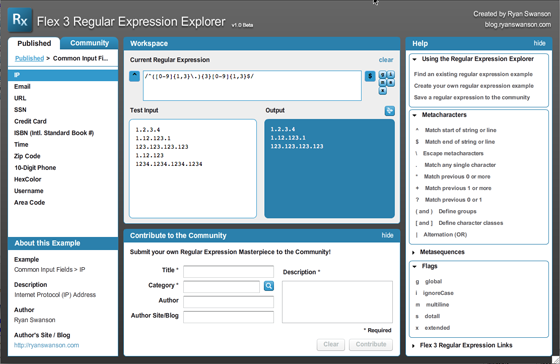
As I was designing this application, I realized there were a number of significant limitations of the other Explorer-style applications and have added features to make the tool more collaborative and easy to use.
Explorer-style interactions: The Workspace
Following the basic concept of an 'Explorer' application, the Regular Expression Explorer provides a Workspace where you can define a regular expression, provide a list of test data and then receive immediate feedback of the results as a list of the input data that matched the expression.Included in the workspace are some convenient tools for editing various aspects of the expression including start match, end match, and flags: global, ignore case, multiline, dotall, and extended. You can also clear the current expression and test data to start over from scratch.
A link for working with output data has been added recently; however, it is not fully implemented and may ultimately be provided through a 'premium edition' that will have a reasonable purchase price. The future plan for this is to support translating between Flex's regular expression syntax and that of other languages like Java, C++, etc.
Syntax Translation will be a very powerful feature and I hope to have time to build it soon. It will allow you to find examples for other languages and bring it into the Explorer to use in Flex projects. It also makes this tool relevant for people who don't code in Flex as they could use this tool for authoring or finding a pre-authored example and simply translate the expression to the language of their choosing.
Regular Expression Explorer: Workspace

Example Library
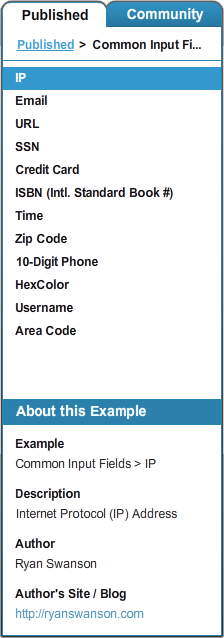
There are 2 parts of the example library: Published and Community.Myself and a few cohorts will be maintaining the Published section. We will include both examples we have created as well as promoting quality examples we find in the community section to the published section.
The main point of keeping the published section separate is to have some semblance of quality and organization.
The community section is appropriately a free-for-all since we want users to have the freedom to create and publish as they see fit.
Regular Expression Explorer: Example Library
Community Contributions
Collaboration is the true power of the Regular Expression Explorer.For many people, regular expressions are an inaccessible, mystical art that they struggle to comprehend and often fail in trying or just give up. In the Flash and Flex community of designers, devigners and developers, there are often a lot of very talented people who have simply never had formal training or degrees in computer science or engineering that would have taught them the concepts of pattern matching, lexical analysis and the like.
For those of us who are quite familiar with regular expressions, they are tedious at best. We love the power of regular expressions, but who really likes writing them when you have deadlines and money to be made? ...well, I guess there is that guy :)
This is where the Regular Expression Explorer's collaborative community steps in.
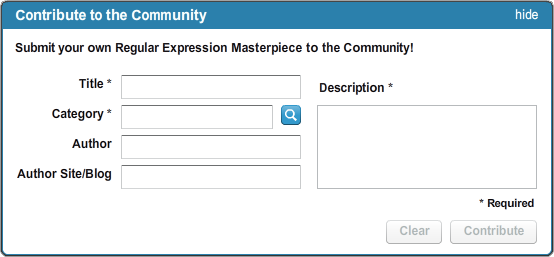
Everyone in the community can contribute an expression they've spent time creating in the tool. And the cost to them is nominal: just type in a few pieces of metadata and click 'Contribute'. Contributors also get credit for their work in the form of a by-line and a link to their own site.
As the community builds a library of regular expressions, we all profit.
People who simply don't understand them can now find an existing example, paste in their own test data to prove it out for their use and then copy and paste the example into their own work.
Those of us who know regular expressions can quickly find if the example we need is out there. And if not, once we've created it, we can now get credit by publishing our work to the world!
Sounds like a win-win-win to me.
Regular Expression Explorer: Contribute to the Community
Help!!!
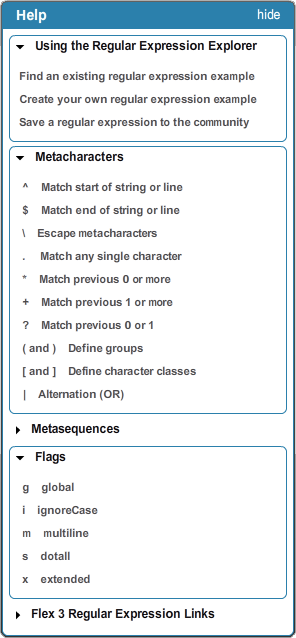
When working with a complex, highly-syntactical technology like regular expressions, providing help resources is crucial for empowering the user.So, I built a contextual help panel into the interface that can be hidden while the user is working. There are 4 primary features provided by the Help panel:
Application Help
The 'Using the Regular Expression Explorer' section includes a series of guides for common user goals as well as tips and tricks for using the interface.
Regular Expression Quick Reference
The 'Metacharacters', 'Metasequences' and 'Flags' sections are quick references to the mostly commonly used aspects of regular expressions. Many of the descriptions include links to Adobe's Flex Reference material, which includes additional details on each item.
Reference Material
The 'Flex 3 Regular Expression Links' section includes quickly accessible links to all of the regular expression-related documents provided by Adobe as well as some additional references and examples.
Interface Highlighting
Throughout the Help panel, whenever a user interface element (panel, tool, button, list, etc.) is referenced, it provides a link to highlight that component directly within the application. This avoids any confusion in terminology and speeds a user's understanding and adoption of the tool.
Regular Expression Explorer: Help System
Tell your friends!
As with any collaborative tool, the power is in the community. So if you like the Regular Expression Explorer, help me (and in turn yourself) by spreading the word!As always, I love to get feedback and ideas for ways to improve my work, so please leave a comment and let me know what you think.
Cheers,
Ryan